 Contact
Us
Contact
Us
Thank you for using the Chisso Corporation website.
How to search this site is explained below in three steps.
1. Notes on searching
*The search is conducted within pages contained in the Chisso Corporation website.
*This search recognizes katakana and hiragana as different characters.
Example: If a search term is typed in hiragana, pages containing that term in katakana will not be included in the search results.
2. Introduction to search methods
Example : Search pages containing both "company" and "investors"
Place space between search terms and click the Search button.

[Tip]
This is effective when you get too many search results. It will narrow down the search results.
Example : Search pages containing either "company" or "investors"
Place space between search terms and click the Search button.

[Tip]
This is effective when there are several terms describing the item you want to search. It will increase the number of search results.
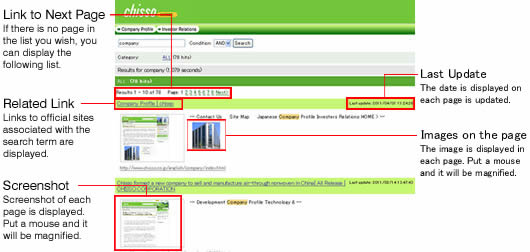
3. Explanation of the search results page



2-2-1 Otemachi, Chiyoda-ku, Tokyo 100-8105
Corporate Administration Dept.
TEL. +81-3-3243-6400
FAX. +81-3-3243-6487

